After uploading the template, review the connector-wide options in the Parameters tab.
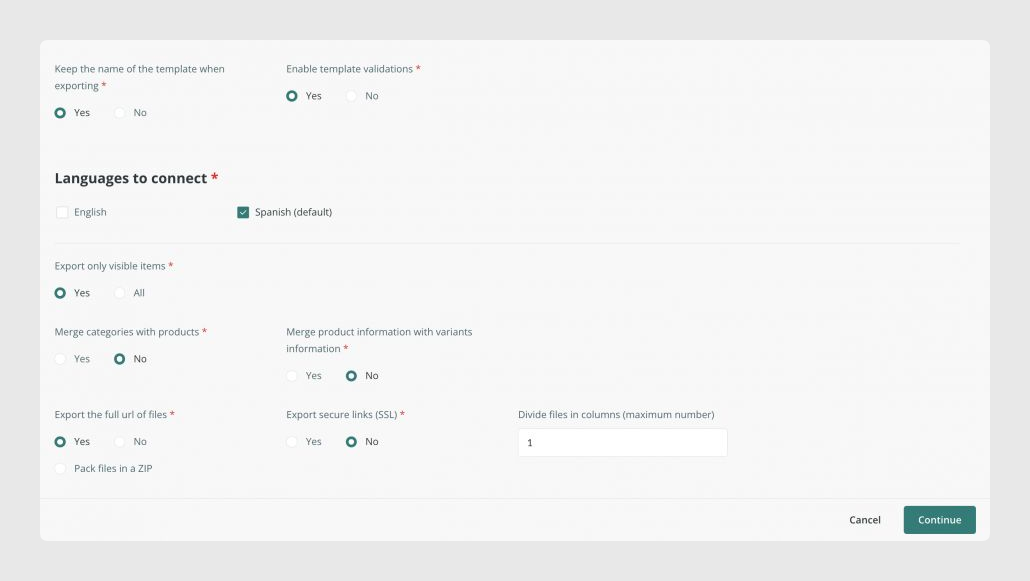
Merge variants with products
The option to merge variants with products controls whether different tables are merged in the export.
If this option is set to Yes, products and variants are exported together. What you map in the Variants tab and what you map in the Products tab will appear in the same sheet of the exported Excel file.
Separate files into columns
The separate files into columns option controls how image and file values are exported.
If the value is 1, image and file names appear in the same row separated by commas.
To place each file or image in a different column, enter the number of columns you need. This creates one file or image per column.
Force refresh
The Force refresh button reprocesses all modifications configured in the connector.
Was this article helpful?
That’s Great!
Thank you for your feedback
Sorry! We couldn't be helpful
Thank you for your feedback
Feedback sent
We appreciate your effort and will try to fix the article