What’s new in version 1.11
Version 1.11 of the Shopify connector introduces several interface and functionality improvements.
- Version 1.11 uses the Shopify API version October 2025, extending compatibility until October 2026.
- All supported fields for data submission are visible in the user interface.
- New connectors are created with this version by default, although migrating existing connectors is not mandatory.
- All fields include help modals with configuration guidance, links, and accepted values.
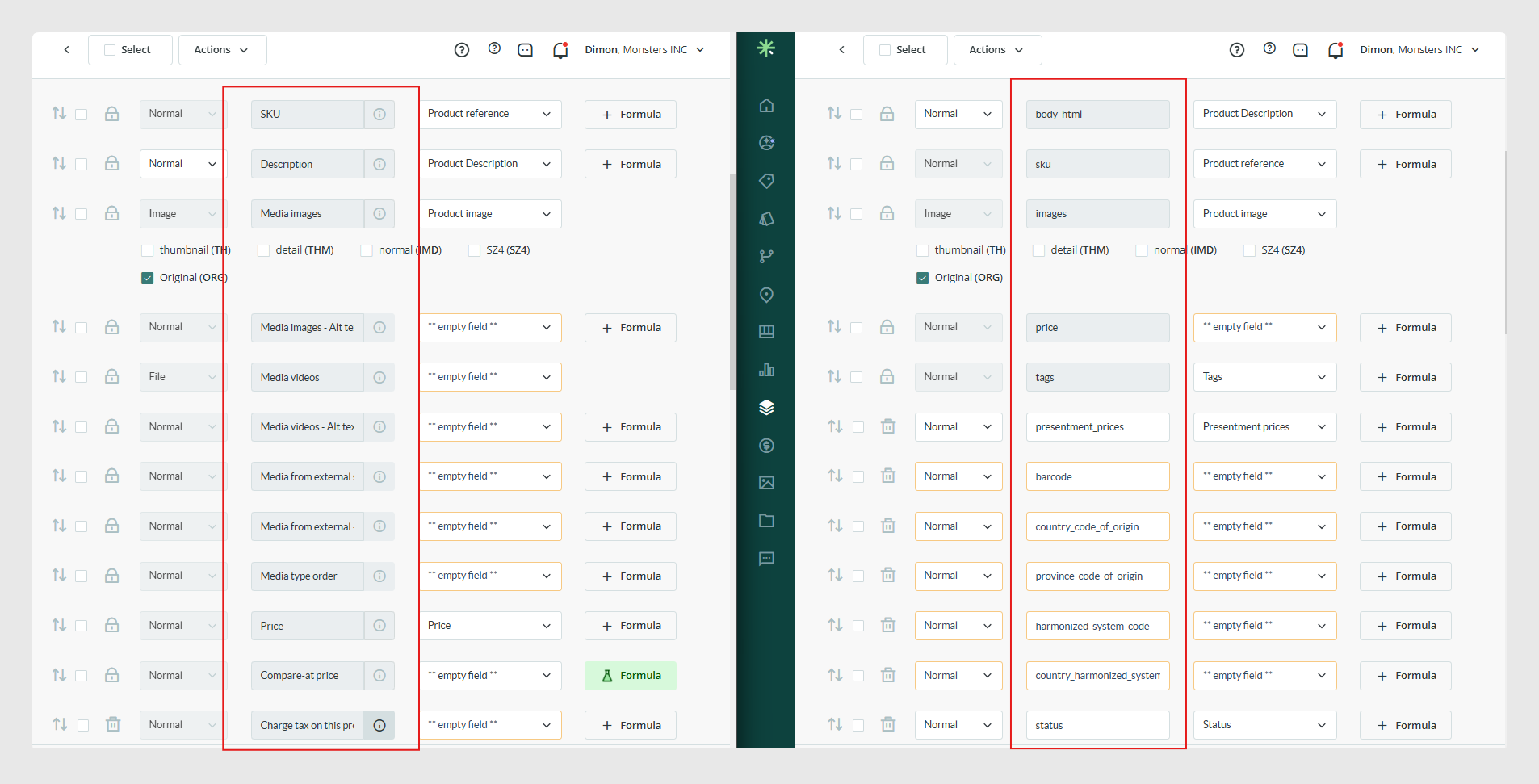
- Fields now use descriptive names, so it is not necessary to know Shopify’s internal field names.
- If you migrate a connector with an existing configuration, no mapping changes are required because the connector adjusts field names automatically.
- No new permissions or scopes are required.
- Repeated fields in Variants, shown under the Products tab, are intended for use with data that does not have variants.
All the changes described in this article are available from connector version 1.11 onward.
Products
A new status called unlisted is available. This makes the product accessible in Shopify only through a direct link, so it will not automatically be visible in the store.
To send this status through the connector, use the value unlisted or U.
Metafields
Starting with version 1.11, the file_reference metafield supports sending .zip files.
It is also now possible to send standard metafields. These help keep data consistent and interoperable across Shopify, because Shopify’s search engine and some native apps only index data stored in official standard metafields.
Standard metafields use the same data types as any other metafield, such as single line text or number integer. They must use the namespace and key defined by Shopify. If custom values are used instead of Shopify’s official values, native Shopify tools will not recognize the metafield.
Example for product EAN codes
- namespace: facts
- key: ean
- type: single_line_text_field
SEO management
Starting with version 1.11, the fields used to send SEO title and SEO description are Search engine listing – Page title and Search engine listing – Meta description. These are created by default in the Categories and Products tables in the connector.
In earlier connector versions, SEO data was assigned through the metafields global_title_tag and global_description_tag. Shopify now recommends using the direct fields listed above to ensure correct behavior.
Sales channels management
As of version 1.11, the info button for the Publishing – Sales channels field returns a list of all sales channels created in the connected store.
Available values for channel activation:
- all: activates all sales channels created in the store.
- third-party: the connector neither publishes nor unpublishes items in any sales channel. Use this if you do not want to change channel configuration or if channels are managed externally from Shopify or external apps.
- | combination: send multiple values separated by |. For example: Online store|Point of Sale.
- Publishing – Sales channels disabled: by default, the Point of Sale channel is activated internally with the value global.
- No value: if the field is enabled and no value is provided, the connector will unpublish the product from all sales channels.
Clearer Shopify field names
Version 1.11 also improves the way Shopify field names are displayed in the connector.
Fields are now shown with clearer and more descriptive names, together with the corresponding internal Shopify name when needed. This makes it easier to identify each field during configuration and reduces the need to know Shopify’s technical field names in advance.
Was this article helpful?
That’s Great!
Thank you for your feedback
Sorry! We couldn't be helpful
Thank you for your feedback
Feedback sent
We appreciate your effort and will try to fix the article