You may need to upload data from PrestaShop into Sales Layer. This can create a common problem because of how PrestaShop manages image names.
Once an image is uploaded into PrestaShop, it is stored with a folder identification system and a unique name per image. For example:
For products:
http://yourdomain/img/p/1/2/3/4/1234.jpg
http://yourdomain/img/p/1/2/3/5/1235.jpg

For categories:
http://yourdomain/img/c/1/2/3/4/1234.jpg
http://yourdomain/img/c/1/2/3/5/1235.jpg
When you access the same images in the shop, PrestaShop replaces the image identifier with the product or category one like this:
http://yourdomain/1234-prod_default/product.jpg
http://yourdomain/1235-prod_default/product.jpg
That is why the URL is exported this way when it comes directly from a PrestaShop export: different folders, but the same image name. When Sales Layer imports it, because the name cannot be duplicated, only one of the many images with the same name will be uploaded.
To avoid this situation, modify the configuration from PrestaShop. Go to Configure > Advanced Parameters > Database > Add new SQL query:
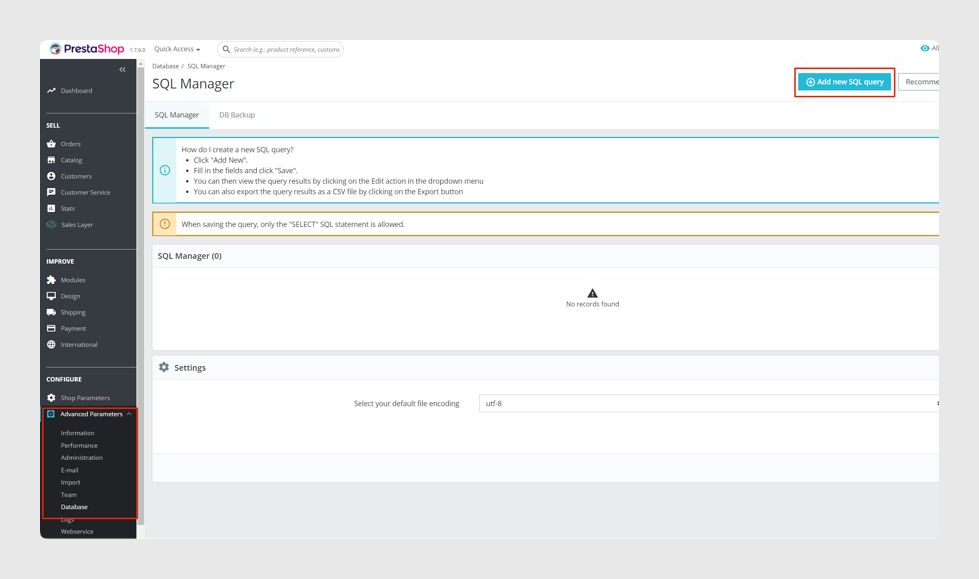
Add the following query to get the content to export from PrestaShop in a CSV file. With that CSV content, you can import it into Sales Layer.
This example uses a fake domain name.
SELECT aux.reference, Group_concat(aux.img SEPARATOR ' ,') AS imagenes
FROM   (SELECT p.id_product, p.reference, CASE
            WHEN Length(im.`id_image`) = 6 THEN
              Concat('https://yourdomain.com', '/img/p/', INSERT(INSERT(INSERT(INSERT(INSERT(im.`id_image`, 2, 0, '/'), 4, 0, '/'), 6, 0, '/'), 8, 0, '/'), 10, 0, '/'), '/', im.`id_image`, '.jpg')
            WHEN Length(im.`id_image`) = 5 THEN
              Concat('https://yourdomain.com','/img/p/', INSERT(INSERT(INSERT(INSERT(im.`id_image`, 2, 0, '/'), 4, 0, '/'), 6, 0, '/'), 8, 0, '/'), '/', im.`id_image`, '.jpg')
            WHEN Length(im.`id_image`) = 4 THEN
              Concat('https://yourdomain.com', '/img/p/', INSERT(INSERT(INSERT(im.`id_image`, 2, 0, '/'), 4, 0, '/'), 6, 0, '/'), '/', im.`id_image`, '.jpg')
            WHEN Length(im.`id_image`) = 3 THEN
              Concat('https://yourdomain.com', '/img/p/', INSERT(INSERT(im.`id_image`, 2, 0, '/'), 4, 0, '/'), '/', im.`id_image`, '.jpg')
            WHEN Length(im.`id_image`) = 2 THEN
              Concat('https://yourdomain.com', '/img/p/', INSERT(im.`id_image`, 2, 0, '/'), '/', im.`id_image`, '.jpg')
            WHEN Length(im.`id_image`) = 1 THEN
              Concat('https://yourdomain.com', '/img/p/', INSERT(im.`id_image`, 2, 0, '/'), im.`id_image`, '.jpg')
            ELSE ''
            END AS 'img', im.cover
        FROM   ps_product p
            LEFT JOIN ps_image im ON ( im.id_product = p.id_product )
            ORDER  BY cover DESC) AS aux
GROUP  BY id_product;
There are two things to consider about this query:
- The domain name has to be adapted in all concat values with the URL.
- The image order has to be included so the cover image follows the image order.
From here, you only need to adapt the query for categories and any other image field to import into Sales Layer.
Was this article helpful?
That’s Great!
Thank you for your feedback
Sorry! We couldn't be helpful
Thank you for your feedback
Feedback sent
We appreciate your effort and will try to fix the article